Calculate product carbon footprints from your Bill of Materials.

Verde365 helps manufacturers turn BOMs, materials, production activities, transport data, and supplier inputs into customer-ready Product Carbon Footprint reports.

Trusted by great companies
Montim
C-Astral Aerospace
Flycom
Veriga
Olma
TKI Hrastnik
Hypex
Folex
SMT
Montim
C-Astral Aerospace
Flycom
Veriga
Olma
TKI Hrastnik
Hypex
Folex
SMT

Your customers are asking for product carbon data. Your team has BOMs, spreadsheets, and deadlines.

For manufacturers, product carbon footprinting is not a simple reporting task. It means connecting engineering data, material quantities, supplier inputs, production energy, transport routes, emission factors, and reporting boundaries.

Most teams start with spreadsheets. Then the problems appear: unclear material names, missing masses, inconsistent supplier data, manual factor matching, duplicated work, and reports that are hard to defend.

Verde365 gives product, engineering, operations, and sustainability teams one workflow for turning manufacturing data into product-level carbon insights.


Routes, distances, and modes. Transport without spreadsheets.

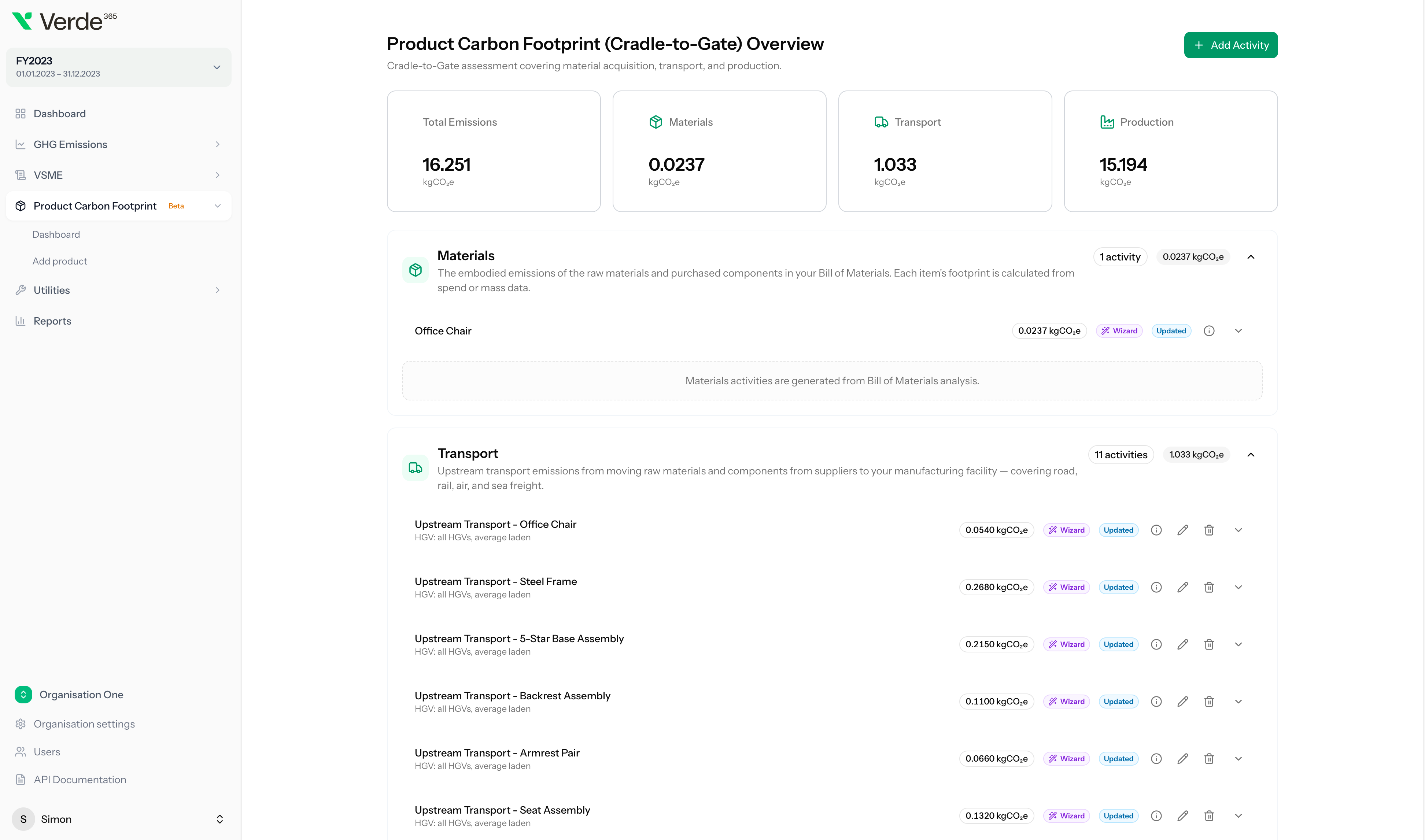
Production runs and transport activities live on the product itself — with routes, distances, modes, and reusable templates. Add the operational layer that turns a material-only estimate into a real product footprint, and re-run the calculation when a supplier or route changes.

See activities in the workflow

Drop in your BOM. The AI handles materials, origins, and transport.

Upload the BOM and Verde365 reads it: classifies materials, infers origins from supplier data, structures the most-used components into the product tree, and guesses transport modes from where suppliers ship from. You stay in control — the AI does the parsing your team would otherwise grind through by hand.

See the AI BOM resolver

After the wizard: pick a factor, or bring your own.

Once your draft footprint is built, refine each activity with the right emission factor. Verde365’s curated library covers materials, fuels, energy mixes, and waste streams. When you have a verified supplier number, drop in a custom factor — your data, your assumptions, your control.

Book a PCF demo

From product setup to a versioned PCF report — six steps.

A guided workflow that takes your team through boundary setup, BOM upload, AI-assisted resolving, activity modeling, the process map, and a versioned report your customers can trust.

01

Set up the product and boundary

Define the product, reporting goal, and calculation strategy. Use process-based or allocation-based approaches and choose the system boundary that fits your customer, tender, or internal reporting needs.

02

Upload your Bill of Materials

Import BOM files, map columns, validate data, align materials, and bulk edit lines before calculation. Verde365 helps structure messy product data before it becomes a carbon calculation problem.

03

Resolve materials with AI assistance

Use AI-powered BOM resolving to classify materials, estimate missing masses, normalize inputs, and suggest relevant emission factor matches. Your team stays in control while Verde365 reduces manual mapping work.

04

Add production and transport activities

Model production activities, transport routes, distances, and templates. Add the operational inputs that turn a material-only estimate into a more useful product footprint.

05

Build the product process map

Use the visual process map to understand how components, production stages, and activities connect. Spot carbon hotspots and review the logic behind the calculation.

06

Generate a versioned PCF report

Create draft and final reports with snapshots of inputs, assumptions, and results. Versioned reports make it easier to respond to customer requests, compare improvements, and preserve calculation history.

Engineered carbon data for every product on your line.

Turn Bills of Materials, supplier inputs and production activities into PCF reports your customers can trust — without spreadsheets, guesswork, or a six-figure consultancy bill.

See how it works From BOM to PCF report in minutes

Everything manufacturers need to calculate and manage product carbon footprints.

Built around real product structures, supplier data, production activities, and customer reporting requests.

BOM import and validation

Upload BOM files, map columns, validate data, align fields, and clean product inputs before calculation. Verde365 helps turn raw product spreadsheets into structured carbon data.

AI-powered BOM resolver

Classify materials, estimate missing masses, select likely factor categories, and normalize messy product data with AI assistance. Keep expert review in the workflow while reducing repetitive manual work.

Component library

Save reusable components globally or per product. Track price history, usage history, imports, bulk edits, and component changes across product footprints.

Production and transport activities

Add manufacturing activities, production inputs, transport routes, and distance-based calculations. Use templates to speed up repeated activity modeling.

Visual process map

Map product processes visually, connect components and activities, and identify the stages that drive product emissions.

PCF reports and snapshots

Create, draft, show, and version PCF reports. Report snapshots preserve inputs and assumptions so teams can review what changed between versions.

Spend-based options

Use spend-based datasets and sector mappings where supplier or activity data is not yet available, then improve accuracy over time.

See it on your own BOM.

Walk through a live BOM-to-PCF workflow with a Verde365 product carbon expert.

Create PCF reports your team can actually explain.

A product footprint is only useful if your team can defend the result. Verde365 helps preserve the calculation logic behind each report — including inputs, assumptions, mapped factors, activities, and report versions.

Use Cases
  • Customer product carbon requests
  • Supplier and OEM questionnaires
  • Tender and procurement requirements
  • Internal hotspot analysis
  • Product improvement planning
  • Scope 3 purchased-goods insights
  • VSME and sustainability reporting support
  • Future product-data readiness

Part of one connected carbon data platform.

Product carbon data should not live in isolation. Verde365 connects PCF workflows with corporate emissions, emission factors, machine consumption, VSME reporting, and unified reports.

Corporate Carbon Footprint

Use Verde365’s GHG module to manage Scope 1, 2, and 3 activities, mass imports, reports, net-zero targets, and decarbonization analysis.

Learn more

Emission Factors

Manage custom organization-level emission factors, multi-gas composition, year and location metadata, source documents, and usage tracking.

Machine Consumption

Track machine and location-level consumption, compare periods, import data, and use operational energy insights to support product and corporate carbon work.

VSME Reporting

Use structured sustainability and carbon data to support VSME Basic and Comprehensive reporting workflows.

Learn more

Unified Reports

Manage PCF, GHG, and VSME reports from one report area with status tracking and per-type detail views.

Ready to turn your BOM into product carbon data?

See how Verde365 helps manufacturers calculate product carbon footprints from BOMs, materials, production activities, transport routes, and supplier inputs.

Frequently asked questions

What is Product Carbon Footprint software?

Product Carbon Footprint software helps calculate greenhouse gas emissions linked to a specific product. For manufacturers, this usually means combining Bill of Materials data, materials, production activities, transport, supplier data, and emission factors into a product-level carbon calculation.

Can Verde365 calculate PCF from a Bill of Materials?

Yes. Verde365’s PCF module includes BOM upload, column mapping, validation, alignment, bulk editing, and AI-assisted BOM resolving for material classification, mass estimation, factor selection, and normalization.

Does Verde365 support cradle-to-gate calculations?

Yes. Verde365 currently supports cradle-to-gate product footprints, using process-based and allocation-based calculation strategies. Cradle-to-grave boundary support is on the roadmap.

Can we reuse components across multiple products?

Yes. Verde365 includes a component library with global and per-product reusable components, bulk editing, import review, price history, and usage history.

Does Verde365 include transport and production activities?

Yes. Verde365 supports production and transport activities, AI suggestions, transport templates, and distance calculation.

Can Verde365 generate PCF reports?

Yes. Verde365 supports PCF report creation, drafts, report viewing, snapshots of inputs, and report versioning.

Is this the same as full LCA software?

Verde365 is focused on product carbon footprinting and carbon data workflows for manufacturers. It is not positioned as full multi-impact LCA software.